

Your subscription
BalieSettings
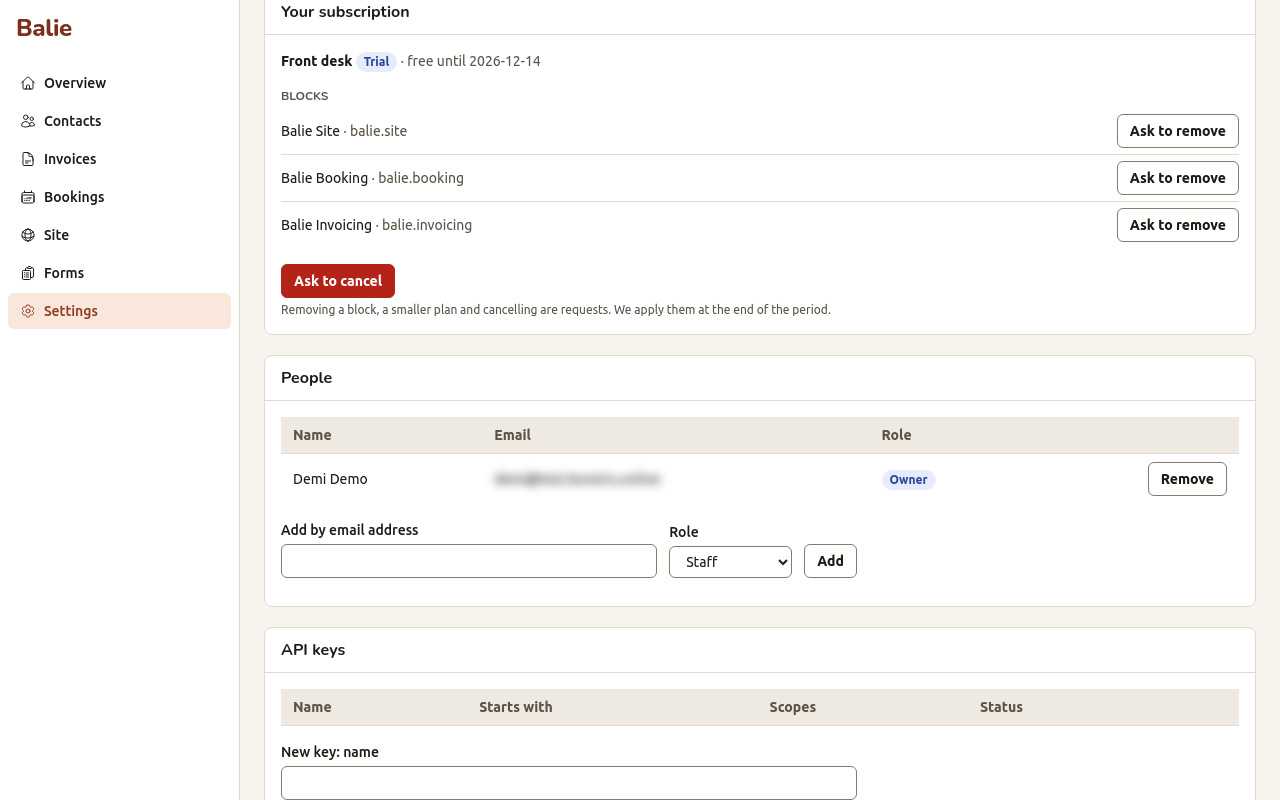
Your subscription is what your organisation uses of the suite: a plan (a set of parts sold together, such as Front desk with site, bookings and invoices) or your own selection of blocks (single parts, such as Balie Site). You manage it in Balie, under Settings, Your subscription. Only owners can change it.
The plans and their prices are shown on the sign-up page; for more about the plans, see shilohbv.com.
What you see
Section titled “What you see”- the name of your plan, or Your own selection of blocks;
- the state of the subscription:
| State | Meaning |
|---|---|
| Trial | The free trial runs. The panel says until when (free until a date). |
| Active | You pay per period; everything works. |
| Past due | An invoice of ours is past its due date. Pay it and the subscription is active again. |
| Suspended | We have paused the account, for example after unpaid invoices. Contact us. |
| Cancelled | The subscription has ended. |
- Blocks: the parts that are switched on;
- ends at the end of the period, when you asked to cancel.
If the panel says Nothing is switched on yet. It appears when your account has been set up., your sign-up is still being set up. This takes a few minutes.
Add a block or move to a larger plan
Section titled “Add a block or move to a larger plan”These happen straight away. The panel shows Add a block and Move to a larger plan only when there is something you can add.
- Under Add a block, choose the block and Add now. For a block that must be paid first the button is Add and pay.
- Under Move to a larger plan, choose the plan and Switch now or Upgrade.
When a change costs more in the current period, Balie makes an invoice for the rest of the period and says We made an invoice for the rest of this period. Pay it to finish. Use Open the invoice to see and pay it. Until it is paid the panel says Pay the invoice to finish the upgrade.
Remove a block, move to a smaller plan, or cancel
Section titled “Remove a block, move to a smaller plan, or cancel”These are requests. We apply them at the end of the current period, so you keep what you paid for until then.
- Ask to remove next to a block;
- Ask to cancel: the subscription ends at the end of the period.
To move to a smaller plan, ask us; the request then shows as Move down to the plan.
Your requests shows each request with its state: Waiting for us, Waiting for payment, Done, Declined or Needs attention.
How you are invoiced
Section titled “How you are invoiced”- The first 30 days are free. After the trial, you pay per month, in advance.
- Our invoices come by e-mail from Shiloh B.V., with a PDF and a link to view them online. They are ordinary invoices, numbered and with tax.
- An addition during a period is charged for the remaining days; a removal takes effect at the end of the period, so nothing is refunded for it.
What happens to your data when you cancel is in Privacy and your data.