

Loyalty and referrals
TiendaLoyalty
With the Loyalty module, customers who are known to the shop earn points on what they buy, and spend them as a discount on a later order.
Set up the programme
Section titled “Set up the programme”- Open Settings, Loyalty programme.
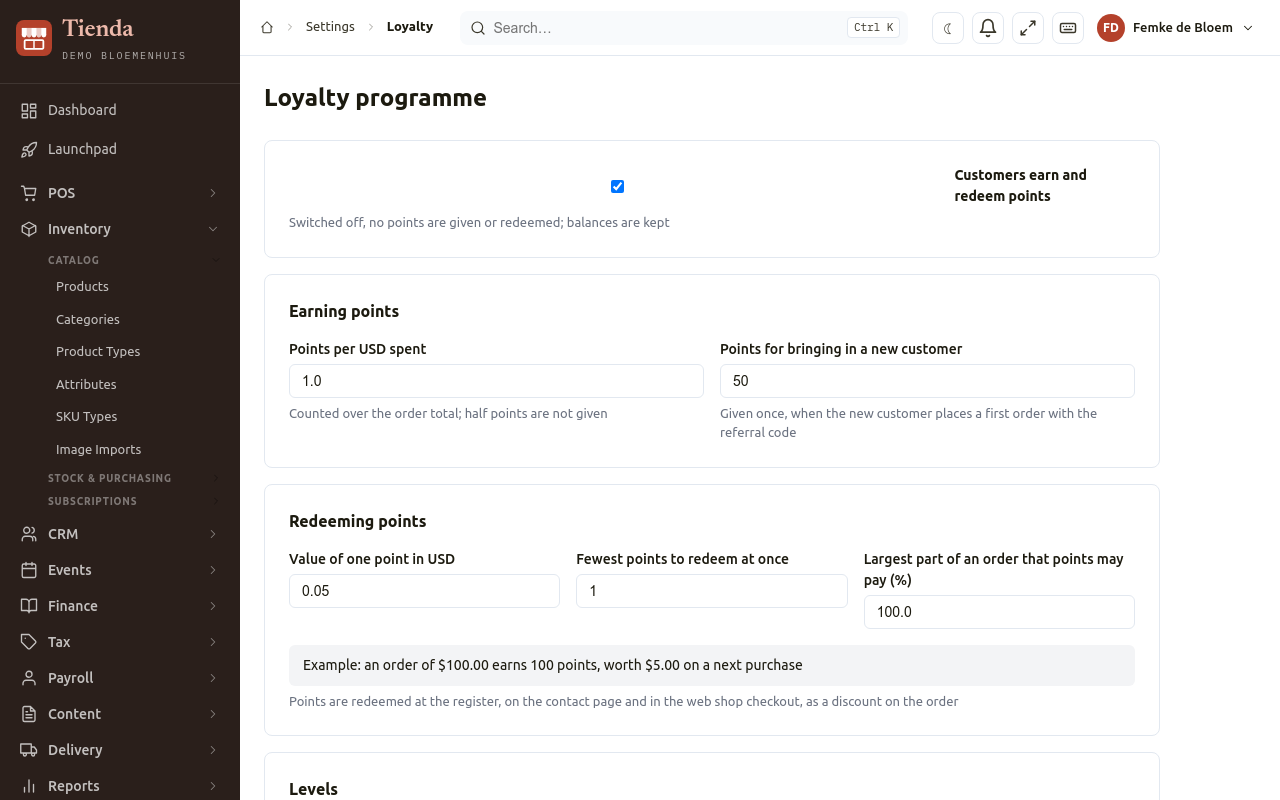
- Tick Customers earn and redeem points. Switched off, no points are given or redeemed; balances are kept.
- Under Earning points:
- Points per dollar (or your currency) spent, counted over the order total; half points are not given;
- Points for bringing in a new customer: given once, when the new customer places a first order with the referral code.
- Under Redeeming points:
- Value of one point;
- Fewest points to redeem at once;
- Largest part of an order that points may pay (%).
- Under Levels, set from how many points a customer is Silver and Gold (everyone starts at Bronze). The level follows all points a customer ever earned; redeeming does not lower it.
- Choose Save.
The page shows an example (an order of a certain amount earns so many points, worth so much on a next purchase), and under Members every customer with a points account, their Level, Points and Value.
Earning and redeeming
Section titled “Earning and redeeming”- Points are earned on orders that have a customer: choose the customer on the New Order form, or the customer is signed in to the web shop.
- Points are redeemed on the New Order form (Redeem), on the contact page, and in the web shop checkout, as a discount on the order.
- A contact’s Loyalty points tab shows the balance and the history.
Referrals
Section titled “Referrals”Each customer gets a referral code and a share link. When a friend places a first order with it, the customer who brought them in gets the points you set. CRM, Referrals lists them: the Referrer, the Referred friend, the Code and share link (Copy link, Copy code), and whether it is Rewarded, Pending or Expired.